
Customer Support
VPS – How can I set reverse IP (PTR) records on my VPS server?
A PTR record (also known as reverse DNS or reverse IP) is used to map your server’s IP address to a domain name. This is especially important if your server sends emails, as it helps ensure deliverability and prevents messages from being flagged as spam.
If you want to configure PTR records for your VPS at Papaki, you can do it easily through your hosting control panel.
Both IPv4 and IPv6 addresses are supported.
Setting PTR Records for Your VPS
Steps:

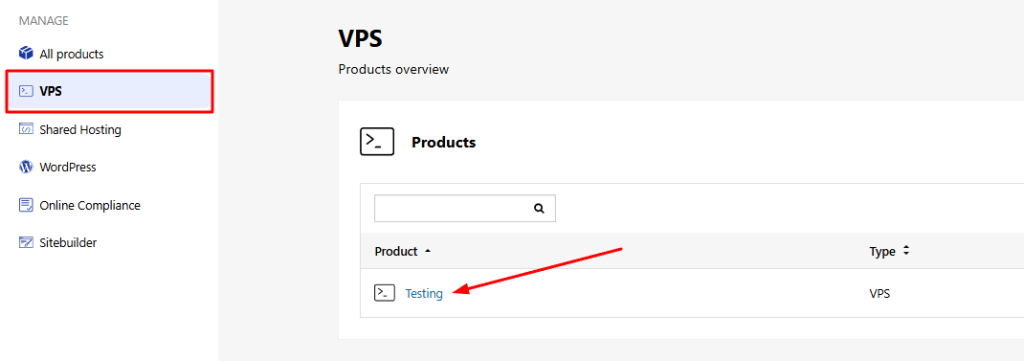
- Locate the VPS hosting package you want to manage from the side menu in your control panel

- Click on the desired plan
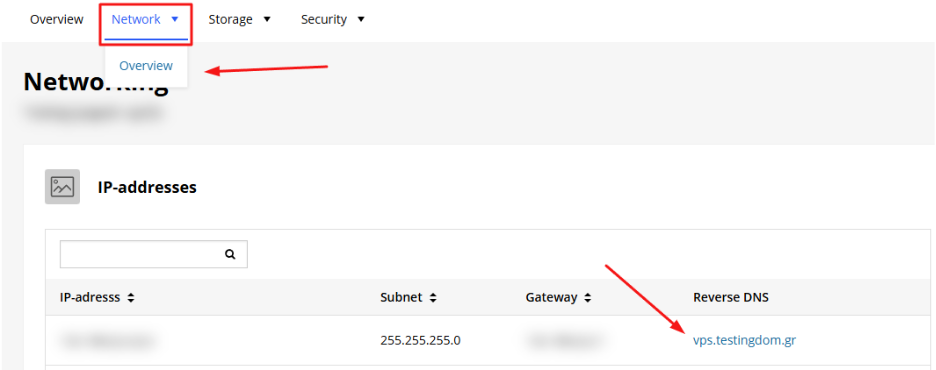
- Go to the Network > Overview
What You Can Configure
In this section, you’ll see a list of all available IP addresses for your server (IPv4 and IPv6). You’ll be able to:
- View the public IPs assigned to your VPS
- Set a PTR record for each IP individually
- Replace or modify existing PTR entries
It is strongly recommended to configure PTR records if your VPS is used to send emails, to avoid being marked as a spam source.
You haven't found what you are looking for?
Contact our experts, they will be happy to help!
Contact us