
Customer Support
How do domains, DNS records, and hosting work in Macaly?
Publishing a project in Macaly makes it available on the internet. Macaly takes care of hosting, deployment, and SSL security, so you do not need to configure servers or third-party services.
What is a domain?
A domain is the address someone types into their browser to visit your website, for example:
example.com
It is the public name of your website. When someone visits that address, the content of your project is loaded.
With Macaly, you do not need to set up a domain from the start. When you publish your project, a working address is automatically created so your website becomes immediately accessible.
Free Macaly Subdomain
Every published project automatically receives a free Macaly subdomain, for example:
https://example.macaly.app
This allows you to:
- put your website online instantly
- share your project with others
- launch without purchasing a domain name
- continue using the free subdomain or connect your own domain later
Note: Older projects may use addresses ending in macaly-app.com. These addresses continue to work normally.
What is a Custom Domain?
A Custom Domain is your own branded address, such as:
example.com
If you already own a domain from a registrar, such as Papaki, you can connect it to your project in Macaly. If you do not have one yet, you can register a domain here.
The connection process may vary depending on your DNS provider or the management environment you use.
In some cases:
- DNS records are configured automatically
- the domain is activated through a partner service
- DNS records are displayed and must be added manually to the active DNS zone
In all cases, instructions are available under:
Settings → Domains
How to Publish Your Website or App
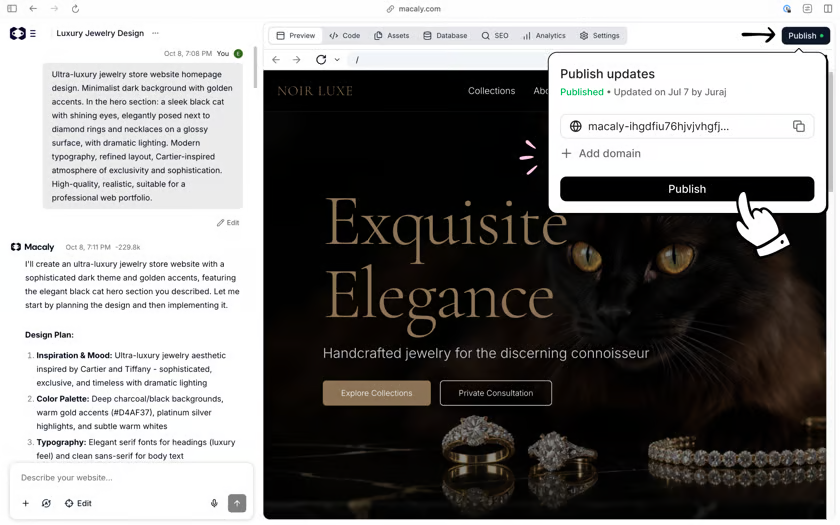
Step 1: Publish Your Project
- Click Publish in the top-right corner of the editor.
- Macaly will automatically build and deploy the latest version of your project.
- Once the process is complete, your website or application will be available through the free Macaly subdomain.
Step 2: Connect Your Own Domain
If you want to use your own domain:
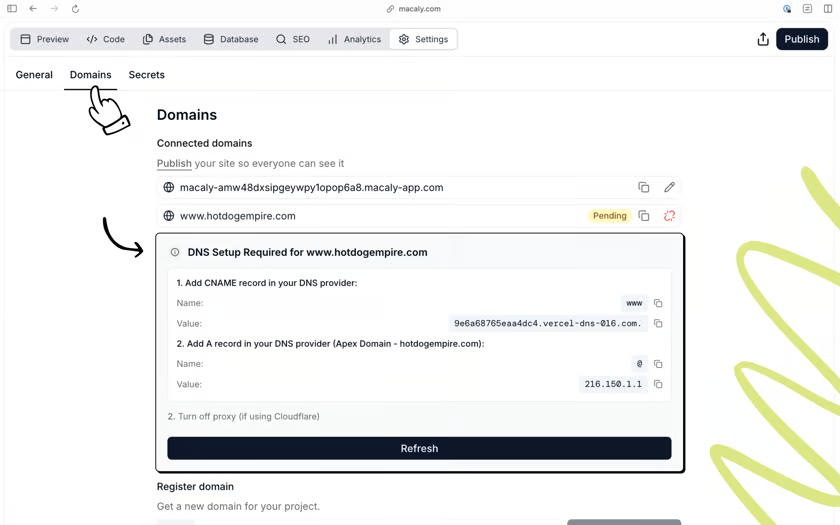
- Go to Settings → Domains.
- Enter your domain name.
- Click Connect.
After connecting your domain, one of the following scenarios may occur:
A. Automatic DNS Configuration
If you see a message indicating that DNS settings are being configured automatically:
- wait a few minutes
- click Refresh
- do not add any DNS records unless instructed to do so
B. Manual DNS Configuration
If DNS records are displayed:
- Copy the exact values shown in the active DNS zone.
- Add them to your domain's DNS management panel.
- Return to Macaly and check the connection status again.
C. Activation Through a Partner Service
In some environments, the domain connection is completed through a partner provider and no manual DNS changes are required.
Where Is My Website Hosted?
Macaly automatically manages:
- hosting
- deployment
- SSL certificates
- HTTPS connectivity
You do not need to:
- install a server
- purchase separate hosting
- configure an SSL certificate
- manage hosting infrastructure
With every new publication, your project is automatically deployed using its latest version.
Frequently Asked Questions
How do I connect my own domain?
Go to Settings → Domains, enter your domain name, and click Connect. Then follow the instructions displayed on the screen.
Which DNS records do I need to add?
Only add DNS records when Macaly asks you to.
Typically, the following records are required:
- an A Record for the root domain
- a CNAME Record for
www
The exact values are displayed in Settings → Domains.
The www version works, but the root domain shows an SSL error
First, check Settings → Domains.
If there is a warning about incomplete DNS configuration:
- add the required A Record
- remove any existing conflicting A or AAAA Records
- refresh the connection status
My domain shows as Pending or Not Connected
If DNS configuration is automatic:
- wait a few minutes
- click Refresh
If DNS configuration is manual:
- verify that the DNS records have been entered correctly
- ensure there are no conflicting records
Keep in mind that DNS propagation can take up to 24 hours.
Can I create a professional email address on my domain?
Macaly does not provide email hosting services.
For addresses such as: info@yourdomain.com
you will need to use a dedicated email service, such as:
- Papaki Email
- Microsoft 365
- any third-party email provider
Once your email address is set up, you can use it to receive notifications from your website's contact forms.
You haven't found what you are looking for?
Contact our experts, they will be happy to help!
Contact us