
Customer Support
How can I re-issue my SSL certificate?
Reissuing an SSL certificate allows you to generate a new certificate by following the activation and installation process from the beginning.
When you may need to reissue
You may need to reissue your SSL certificate in the following cases:
- Loss of Private Key
If you have lost the Private Key, it is not possible to use the existing certificate. In this case, reissuance is required.
- Change of server or hosting environment
If you want to install the SSL on a different server or environment (e.g. IIS, Apache, Nginx), it is recommended to generate a new CSR through reissuance.
- Change of validation method
If you want to change the domain validation method (e.g. from email to file-based validation), you will need to reissue the certificate or contact the Customer Support team.
- Compliance with new Certificate Authorities policies
New Certificate Authority policies require periodic revalidation of domain ownership (typically every 200 days or earlier, starting with certificates purchased after 15/03/2026). For this reason, you may need to reissue your certificate before its expiration date.
How to reissue
To reissue your SSL certificate:
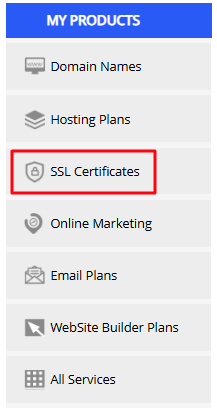
- Navigate to the SSL certificates section from the left-hand menu
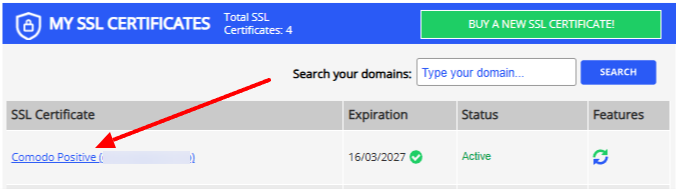
- Select the certificate you are interested in by clicking on its name
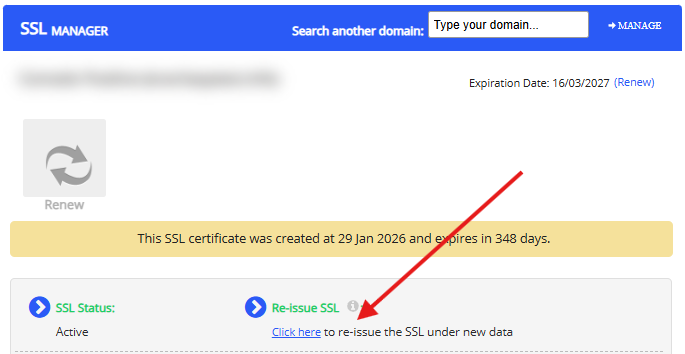
- In the SSL reissue option, select "Click here"
You will then need to:
- Generate a new CSR and Private Key
- Select a validation method
- Complete the activation process
- Install the new certificate on your server
The process is the same as the initial issuance. You can find the installation guide that suits you here.
Will your website be affected?
Reissuing the certificate itself does not affect your website’s operation.
However, the new certificate will only be used after it is installed on your server.
Important information
- The expiration date of the certificate does not change after reissuance
- The reissue process can be performed as many times as needed
- It is not possible to change the domain name if more than 20 days have passed since the initial activation of the certificate
Important note regarding CSR creation
Each reissue generates a new CSR and Private Key pair.
Make sure you use the correct Private Key during installation, otherwise the certificate will not function properly.
If the certificate remains in Pending status
- Check that the validation (TXT or email) has been completed successfully
- Make sure the folder where you uploaded the .txt file is publicly accessible
- Wait a short period and try again
Note
Reissuing is a safe and common process and does not affect the functionality of the certificate, provided that the installation on your server is completed correctly.
You haven't found what you are looking for?
Contact our experts, they will be happy to help!
Contact us