
Customer Support
What is the Welcome Page and how to enable it?
Papaki offers you a free Welcome Page that appears when someone visits your domain, until you create your own website.
If you haven’t modified your nameservers or the content of your DNS records after their initial setup and the activation of Papaki’s free DNS service, the Welcome Page is already active.
It may take up to 24–48 hours after your domain registration or the declaration of Papaki nameservers for the Welcome Page to become visible online.
Attention!
The Courtesy Page feature is available in the new Papaki Control Panel.
If your domain is still managed through the old Papaki Control Panel, you can activate the “Under Construction” page instead. See more information
here.
How can I check if the Welcome Page is active?

- From the right-hand side menu, select the domain you want to check.
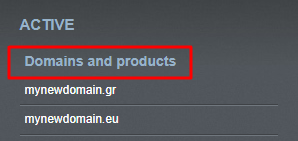
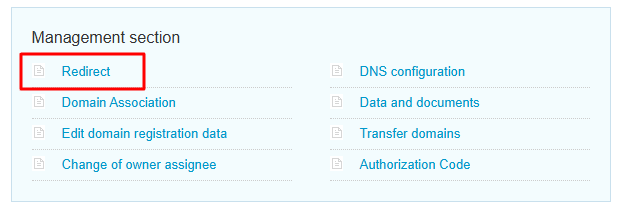
- Click Domain & DNS → Redirect.
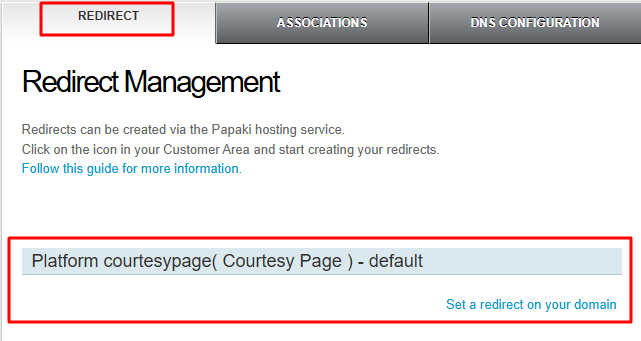
- In the Redirect tab, you can see:
- Whether the Welcome Page (Courtesy Page) is set as default, or
- Whether your domain is connected to an active hosting plan.
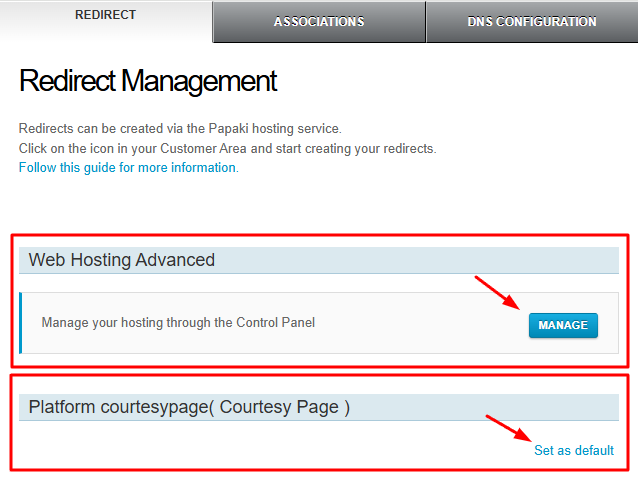
If your domain is connected to a hosting plan and you wish to use the Welcome Page instead, select Set as default.
The Manage button will redirect you to your hosting management page.
Note: If no redirect is set and your domain is not linked to any hosting plan, the Welcome Page is automatically enabled.
Attention
If you want to create a redirect to a specific page (for example, another website or a temporary URL), follow the instructions in the related guide available here.
Frequently Asked Questions (FAQ)
Does the Welcome Page appear even if I have uploaded a website?
No. Once your domain is connected to a hosting plan or a redirect is set, the Welcome Page is automatically disabled.
Can I change the content of the Welcome Page?
No, the content of the Welcome Page is predefined by Papaki. If you wish to display your own message or design, you can upload a temporary “Coming Soon” page to your hosting plan.
Why can’t I see the Welcome Page even though I haven’t uploaded a website yet?
It’s possible that the nameservers haven’t propagated yet. This process may take up to 48 hours. Also, check if a redirect or an active hosting plan is already linked to your domain.
You haven't found what you are looking for?
Contact our experts, they will be happy to help!
Contact us