
Customer Support
What is a Tech Administrator and how to use it.
The Tech Administrator is a special role in Papaki that allows you to delegate the technical management of your services to partners, developers, or resellers without sharing your password and without exposing personal or sensitive data.
It provides a secure, controlled, and practical way to grant access.
The technician can manage services, view invoices, and place orders on your behalf, but cannot edit your personal information or your payment methods.
What is the Tech Administrator?
The Tech Administrator is a user who has an active Papaki account and whom you optionally authorize to access and manage your services.
This role allows you to grant technical access safely and with full control, avoiding the risks of shared passwords.
What the Tech Administrator can do
The technician has access only to your services and can:
- Manage domains
- Renew services
- Purchase new services on your behalf
- Manage DNS
- Access the email control panel
- Create or delete mailboxes
- View and download invoices
- Perform technical management tasks independently
What the Tech Administrator cannot do
The technician cannot:
- Edit your personal information
- View or change your payment methods
- Change your main account email
- Modify passwords
- Make changes that are considered sensitive without OTP verification
How the process works
1. The technician shares the “Tech Code”
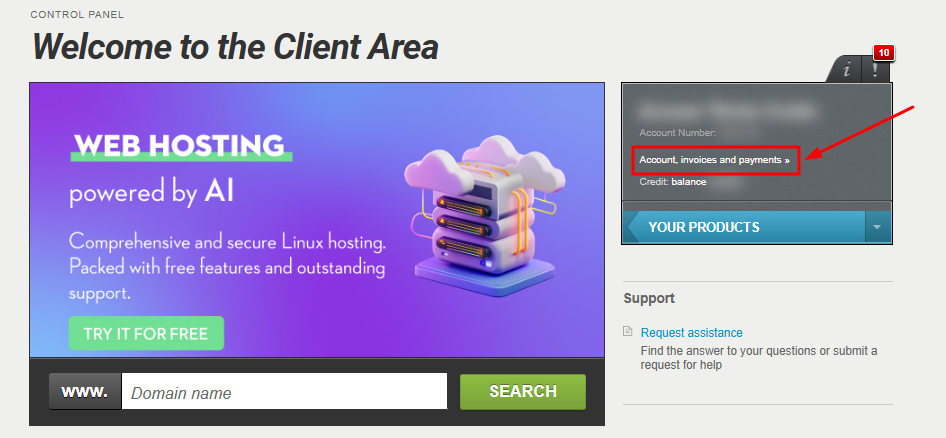
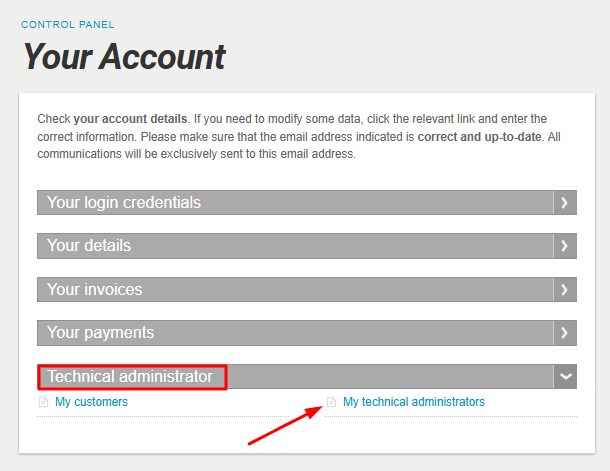
In their own control panel, the technician goes to “Account, invoices and payments”.
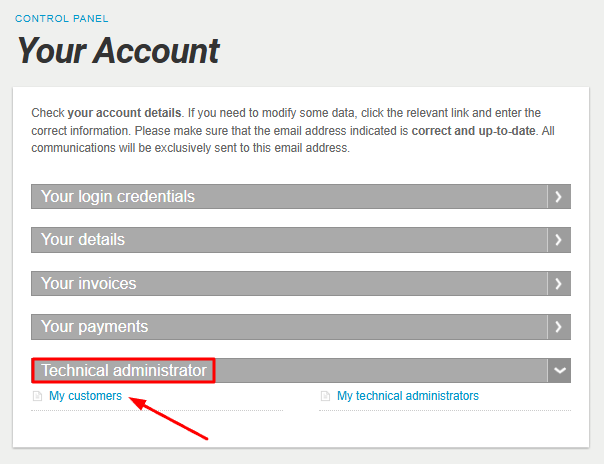
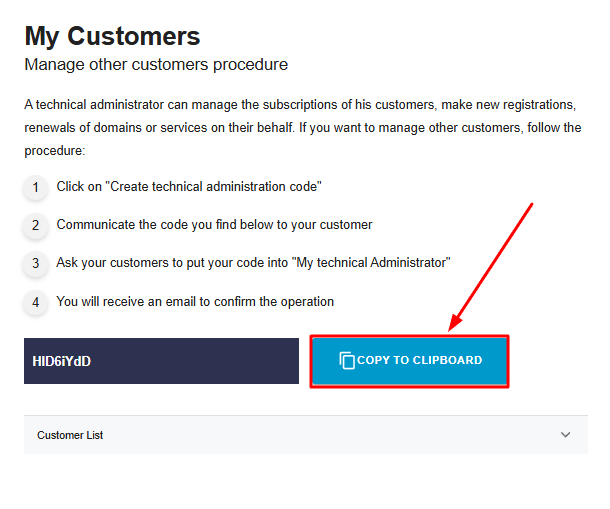
Then, under “Technical administrator”, they select “My customers” and copy their unique Tech Code.
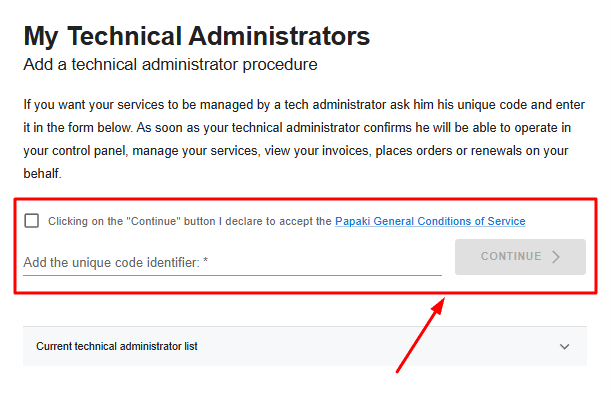
2. The customer enters the Tech Code
In your control panel, you also go to “Account, invoices and payments”.
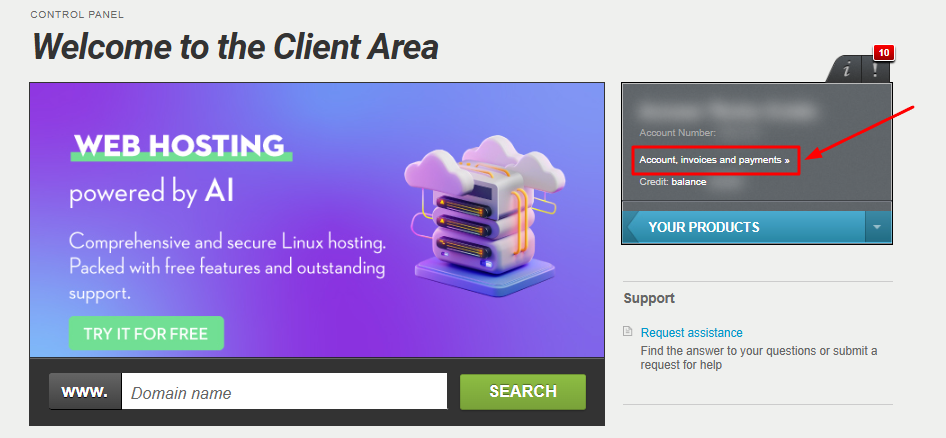
Under “Technical administrator”, you select “My technical administrators” and enter the unique code you received from your technician.
3. The technician accepts
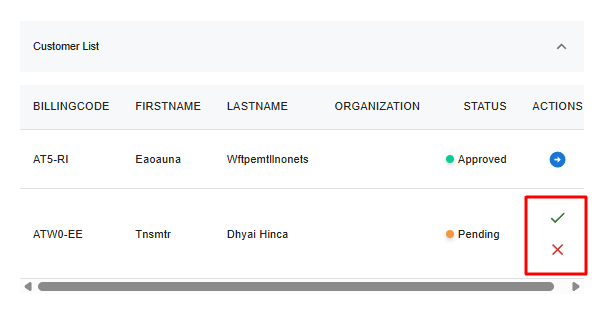
The technician receives your request and accepts it. At that point, they gain access to your control panel.
4. The customer receives a confirmation email
You receive an email confirming that the technician has accepted your request and can now manage your services.
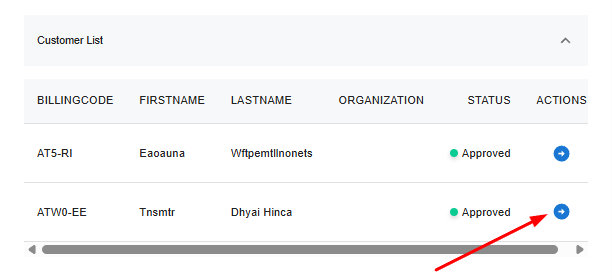
5. The technician gains access
The technician can now view and manage only your services.
They do not have access to any personal data or payment information.
For any technical change considered sensitive—such as changing nameservers—the technician will receive an OTP verification code via email.
Why use the Tech Administrator role
- You do not share your password with anyone.
- You significantly reduce security risks.
- You comply with GDPR and NIS2 requirements.
- You maintain full traceability and control over all actions.
- You avoid problems created by shared accounts.
- The technician uses their own account, not yours.
- You can revoke access at any time.
How to remove a Tech Administrator
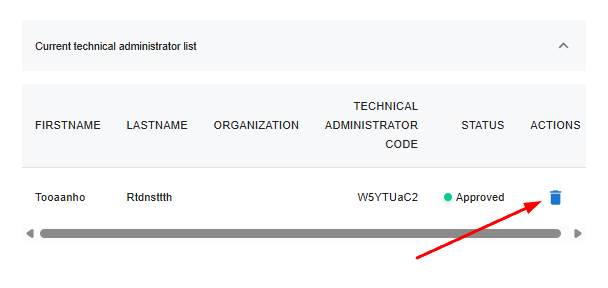
You can immediately revoke access by deleting the technician’s code from the “My Tech Administrators” section.
The technician is removed from the list and loses access instantly.
Frequently Asked Questions (FAQ)
Why not simply give my technician my password?
Because it is unsafe and can lead to security issues or even legal implications.
With Tech Admin, you grant controlled and fully revocable access.
Will the Tech Admin see my personal data?
No. They only have access to your services, not your personal information.
Is it easy to use?
Yes. The technician provides the code, you enter it, the technician accepts, and access is activated.
Is there any cost?
No. This feature is included in your service.
Can I remove access?
Yes, at any time through your control panel.
How many customers can one Tech Admin have?
As many as they want. There is no limit.
You haven't found what you are looking for?
Contact our experts, they will be happy to help!
Contact us